Table Plan Plugin
SAP Customer Checkout shows the open tables in Table Service only as a list of tiles. The Table Plan Plugin adds a tab named "Tischplan" (table plan) to the table overview, on the far left before Alle Tische (all tables) and Meine Tische (my tables). It shows the dining room as a graphical floor plan, the way hospitality systems usually do.
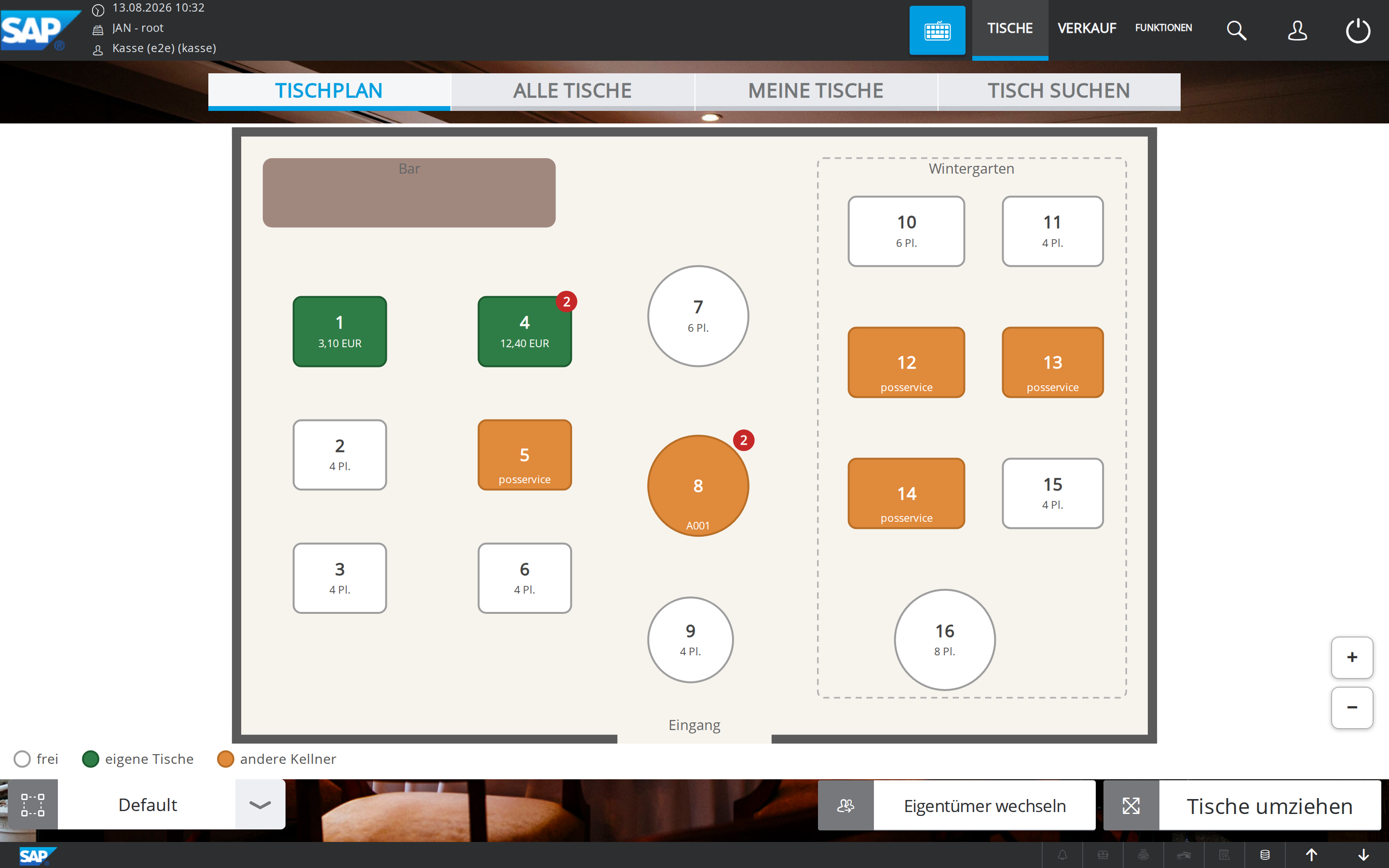
What the plugin does
- Tables where they actually stand: square or round, with number, seats and live status. White means free, green is your own table (with the amount), orange belongs to another waiter. A red badge marks several receipts on one table.
- Tapping opens the table: a free table starts a new receipt, an occupied one opens its receipt. With several receipts on a table the receipt picker appears, your own receipts first.
- One plan per table area: you switch floors and areas with the familiar area dropdown at the bottom left, and the plan follows immediately.
- Combine tables: for large parties, several tables become one unit with a shared frame and label ("3+4"). They move together and can be tapped as one unit. "Teilen" (split) separates them again.
- Nothing gets lost: occupied tables without a position in the plan appear as clickable chips below the plan.
- The native actions "Tische umziehen" (move tables) and "Eigentümer wechseln" (change owner) also work in the plan. In selection mode a tap selects the table instead of opening it.
- The plan updates live through the POS's normal Table Service updates. No extra backend, no additional polling.
- Edit directly at the POS, without a file and without a restart (see Usage).
- Optimized for tablets, handhelds and smartphones: pinch zoom and panning, large tap targets, and a switchable table list on narrow screens.
Components
| Component | Purpose |
|---|---|
| Plugin jar | The table plan tab on the POS, including edit mode. |
| Table Plan Editor | A program or HTML page for your workstation: draw the floor plan with walls, a bar, zones and text labels. Included with every release. |
| Table Plan Hub | Optional small service: one centrally maintained layout for all POS systems of a business. See Table Plan Hub. |
Requirements
- SAP Customer Checkout 2.0 FP21 (on-premise) or Cloud Edition 3.0, running in Table Service mode.
- The table areas the plan refers to must exist on the CCO Manager and be assigned to the POS's org node (see Configuration).
- A valid license from the customer portal. It is already embedded in the downloaded jar.
On FP21 the plan updates passively and live. The Cloud Edition does not refresh its table data passively; there the plan is up to date when you open the tab and after your own actions.
Getting started
- Installation: place the jar, provide an initial plan.
- Configuration: table areas, plugin settings.
- Usage: the tab in daily use, editing the plan.